Recommended for:
✓ Users who want to force GPU fans to high speeds during gaming to drop temps
✓ Users who want to identify exactly which fan is which and control them individually
✓ Users looking for an intuitive dashboard to manage cooling without BIOS complexity

| Fan Control (V266) | |
| Use Case: | Manual/Auto CPU & GPU Fan Control |
| Format: | Portable (No Installation Required) |
How to Use Fan Control: Forcing Your GPU Cooler to Spin
Step 1: Auto-Detect Hardware
Upon launching, the program automatically scans for all fans connected to your system. It is highly effective at identifying GPU fans, which will appear clearly in the list.
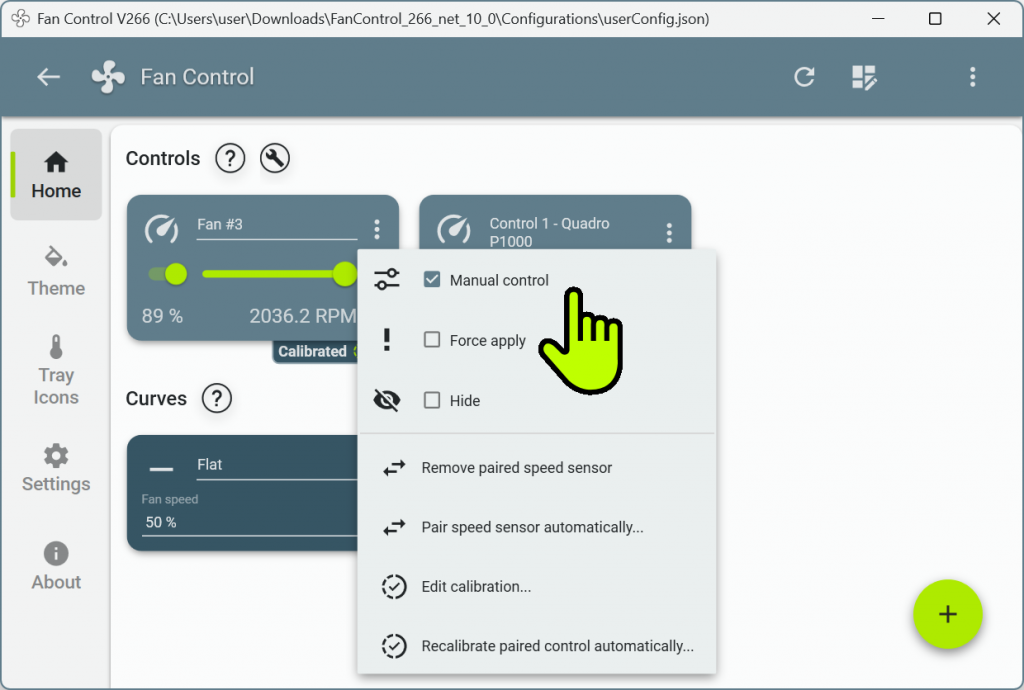
Step 2: Enable Manual Control
Click the three dots (⋮) next to the specific fan you want to control and check ‘Manual Control’. This instantly activates the slider bar for speed adjustment.
Step 3: Adjust Speed & Wait for Response
Move the slider to your desired percentage. Please note that it may take 30 to 60 seconds for the physical hardware to respond to the new instruction and adjust its RPM.
Step 4: Verify Hardware Operation
The most reliable check is to visually confirm the fan is spinning by looking inside your PC case. You can also listen for changes in noise or monitor the RPM readout in the app.
Personal Review: Using Fan Control
At first, you might be confused about which fan corresponds to which header. However, once you test them one by one in Manual mode and rename them, there is no better management tool. It is particularly effective when you need to force a GPU fan to spin. For anyone who has felt uneasy because their fans weren’t spinning enough under stock settings, Fan Control is the perfect solution for peace of mind and superior cooling performance.Official Website: https://getfancontrol.com/